Cut AWS Costs with EC2 Instance Savings Plans
Coding > May 2026 · Peerapat A ·
Bottom Line Up Front: An EC2 Instance Savings Plan is a flexible pricing model that offers up to 60% savings on AWS compute usage in exchange for a 1- or 3-year hourly spend commitment. This guide explains how to choose, purchase, and manage Savings Plans effectively.
AWS bills have a habit of growing quietly. One of the easiest ways to push them back down — without changing a single line of code — is an EC2 Instance Savings Plan. Here is what it is, how to pick the right one, and what real savings look like.
What is a Savings Plan?
A Savings Plan is a deal between you and AWS: you promise to spend a fixed amount per hour for 1 or 3 years, and AWS gives you a discount on everything that matches. No capacity reservations, no complex configuration — just a spending commitment.
There are three types:
- EC2 Instance Savings Plan — biggest discount (~40–60%), but locked to one instance family in one region.
- Compute Savings Plan — smaller discount, but works across any instance family, region, Fargate, and Lambda.
- SageMaker Savings Plan — for ML training and inference workloads only.
For teams with stable EC2 usage in a specific region, the EC2 Instance Savings Plan gives the best return.
How It Works
You pick an instance family (e.g.
The screenshot below shows real AWS pricing for the
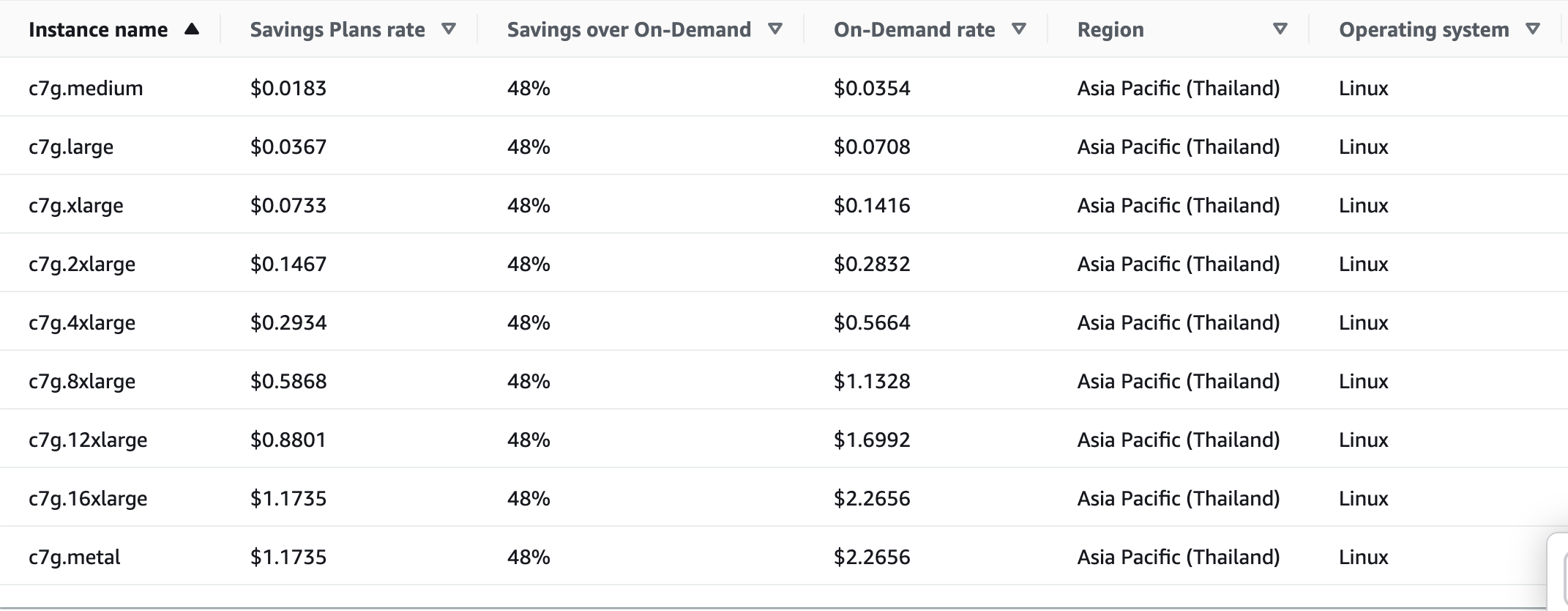
A
Choosing a Payment Option
Each plan comes in three payment flavours:
- All Upfront — pay the full amount today. Deepest discount.
- Partial Upfront — half now, half spread monthly. Middle ground.
- No Upfront — monthly payments only. Lowest discount, zero cash outlay today.
If your workload is stable and the budget allows it, All Upfront on a 3-year term delivers the best return. If you are unsure, start with No Upfront on a 1-year term — you can always buy more later. You cannot cancel or reduce a plan once purchased.
How Much to Commit
The most common mistake is over-committing. If you buy more than you use, the unused portion is simply wasted. The safe approach is to commit to your minimum steady usage — the amount that is always running, even on quiet nights and weekends.
A simple sizing process:
- Open Cost Explorer → Savings Plans → Recommendations.
- Set lookback to 30 days, term to 1 year, payment to No Upfront.
- Take the recommended commitment and buy at 70–80% of it.
- Review coverage and utilization after 30 days, then top up if needed.
Starting conservative keeps utilization high. You can always layer on more commitment as you gain confidence.
Purchasing a Plan
Once you know how much to commit, the purchase takes only a few clicks in the AWS console. Navigate to Cost Explorer → Savings Plans → Purchase Savings Plans, select EC2 Instance Savings Plans, choose your instance family, region, term, and payment option, then enter the hourly commitment amount.
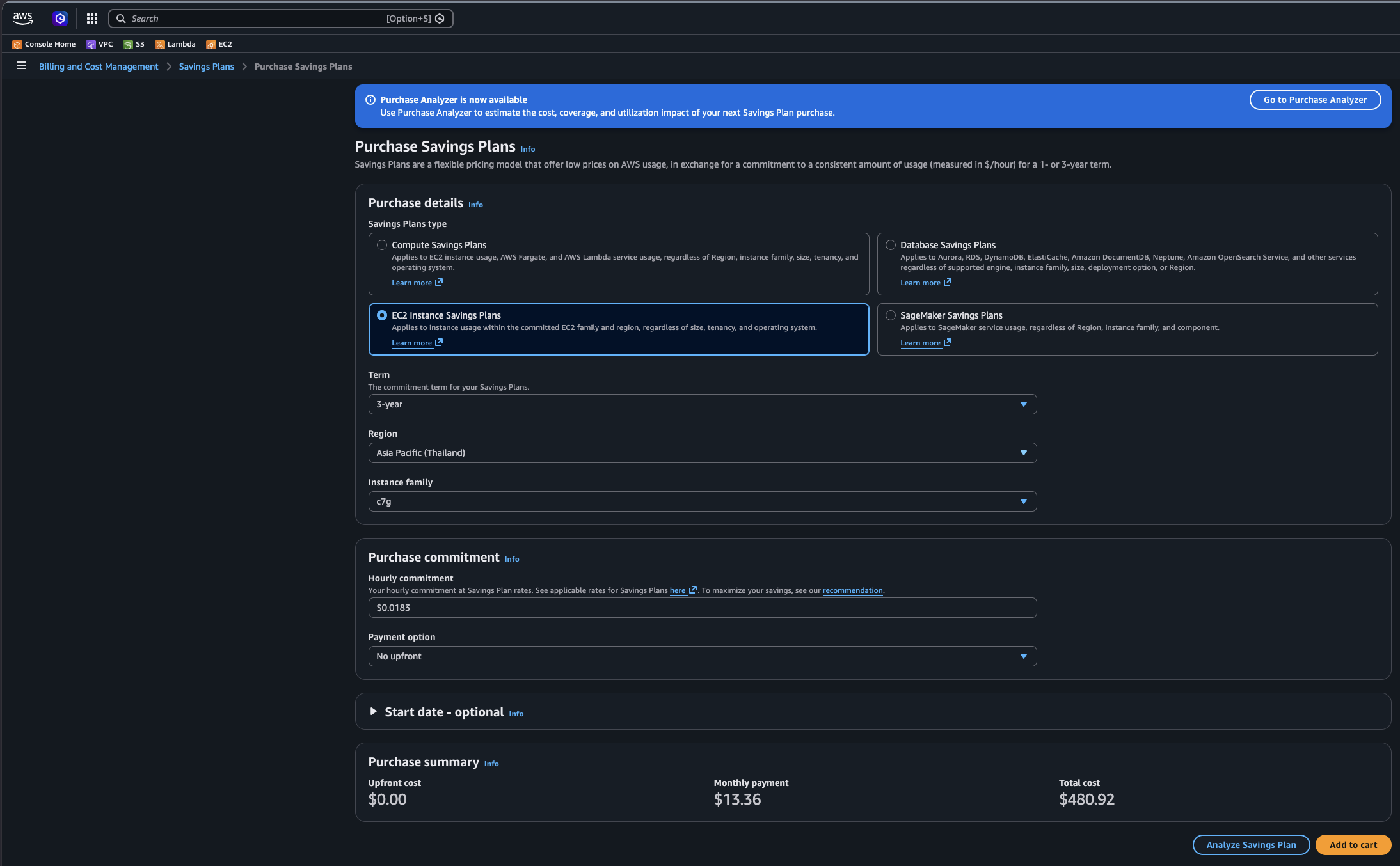
Review the estimated monthly savings shown on the confirmation screen before clicking Purchase. The plan becomes active within minutes and starts applying discounts to matching usage immediately. Remember: the commitment cannot be cancelled or reduced, so double-check the hourly amount before confirming.
Two Numbers to Watch
Once your plan is active, track these weekly in Cost Explorer:
- Coverage — what share of your EC2 spend is protected by a Savings Plan. Aim for 80–90%. Below 70% means you are leaving savings on the table.
- Utilization — what share of your committed spend is actually being used. Aim for above 95%. Below 80% means you over-bought.
When to Skip It
- New workloads — wait for 30–60 days of usage data before committing.
- Planning to switch instance families — use a Compute Savings Plan instead so the discount travels with you.
- Batch or ML jobs — Spot Instances give 60–90% off and are almost always the better call here.
- Dev/test that shuts down at night — schedule the stop first, then see if the remaining baseline is worth committing to.
Bottom Line
EC2 Instance Savings Plans are one of the lowest-effort cost reductions available on AWS. No architecture changes, no migrations — just an analysis and a purchasing decision. Commit to your floor, watch your coverage and utilization, and layer on more as usage stabilizes. Done right, it is realistic to cut your EC2 bill by 40–60% on steady workloads.
Pricing shown is for Asia Pacific (Thailand) as of mid-2026. Always verify current rates in the AWS Pricing Calculator before purchasing.
ลดค่าใช้จ่าย AWS ด้วย EC2 Instance Savings Plans
May 2026 · Peerapat A · ← Coding
สรุปประเด็นสำคัญ (BLUF): EC2 Instance Savings Plan เป็นรูปแบบการกำหนดราคาที่ช่วยประหยัดค่าใช้จ่ายการประมวลผลบน AWS ได้ถึง 60% โดยแลกกับการตกลงที่จะจ่ายค่าบริการรายชั่วโมงขั้นต่ำเป็นระยะเวลา 1 หรือ 3 ปี บทความนี้อธิบายวิธีเลือก ซื้อ และจัดการ Savings Plans เพื่อเพิ่มความคุ้มค่าสูงสุด
บิล AWS มักจะเพิ่มขึ้นอย่างเงียบๆ หนึ่งในวิธีที่ง่ายที่สุดในการลดค่าใช้จ่ายลง — โดยไม่ต้องเปลี่ยน code แม้แต่บรรทัดเดียว — คือการใช้ EC2 Instance Savings Plan นี่คือคำอธิบายว่ามันคืออะไร วิธีเลือกสิ่งที่ใช่ และตัวเลขการลดค่าใช้จ่ายที่แท้จริง
Savings Plan คืออะไร?
Savings Plan คือข้อตกลงระหว่างคุณกับ AWS: คุณสัญญาว่าจะจ่ายเงินจำนวนคงที่ต่อชั่วโมงเป็นเวลา 1 หรือ 3 ปี และ AWS จะให้ discount สำหรับทุกสิ่งที่ตรงตามเงื่อนไข ไม่มีการทำ capacity reservations ไม่มีการตั้งค่า configuration ที่ซับซ้อน — มีเพียงแค่ spending commitment
มีอยู่ 3 ประเภท:
- EC2 Instance Savings Plan — ให้ discount สูงสุด (~40–60%) แต่จะถูกล็อคกับ instance family เดียวใน region เดียว
- Compute Savings Plan — ให้ discount น้อยกว่า แต่ใช้งานข้าม instance family, region, Fargate และ Lambda ได้
- SageMaker Savings Plan — สำหรับ ML training และ inference workloads เท่านั้น
สำหรับทีมที่มีการใช้งาน EC2 อย่างคงที่ใน region เฉพาะ EC2 Instance Savings Plan จะให้ผลตอบแทนที่ดีที่สุด
วิธีการทำงาน
คุณเลือก instance family (เช่น
รูปภาพด้านล่างแสดง pricing ของ AWS สำหรับ
การเลือก Payment Option
แต่ละ plan จะมีรูปแบบการชำระเงิน 3 แบบ:
- All Upfront — จ่ายเต็มจำนวนวันนี้ ให้ discount สูงสุด
- Partial Upfront — จ่ายครึ่งหนึ่งตอนนี้ และที่เหลือจ่ายรายเดือน เป็นทางเลือกกลางๆ
- No Upfront — จ่ายรายเดือนเท่านั้น ให้ discount ต่ำสุด ไม่ต้องจ่ายเงินก้อนวันนี้
หาก workload ของคุณคงที่และงบประมาณเอื้ออำนวย การเลือก All Upfront บนระยะเวลา 3 ปีจะให้ผลตอบแทนดีที่สุด หากคุณไม่แน่ใจ เริ่มด้วย No Upfront บนระยะเวลา 1 ปี — คุณสามารถซื้อเพิ่มได้เสมอในภายหลัง คุณ ไม่สามารถ ยกเลิกหรือลด plan ได้เมื่อทำการซื้อแล้ว
ควร Commit เท่าไหร่
ข้อผิดพลาดที่พบบ่อยที่สุดคือการ over-committing ถ้าคุณซื้อมากกว่าที่คุณใช้ ส่วนที่ไม่ได้ใช้ก็จะสูญเปล่า วิธีที่ปลอดภัยคือ commit เท่ากับ minimum steady usage — ปริมาณที่รันอยู่เสมอ แม้ในคืนที่เงียบสงบหรือวันหยุดสุดสัปดาห์
กระบวนการ sizing ง่ายๆ:
- ไปที่ Cost Explorer → Savings Plans → Recommendations
- ตั้งค่า lookback เป็น 30 วัน, term เป็น 1 ปี, payment เป็น No Upfront
- นำ commitment ที่แนะนำและซื้อที่ประมาณ 70–80% ของค่านั้น
- ตรวจสอบ coverage และ utilization หลังจากผ่านไป 30 วัน แล้วค่อยเพิ่มหากจำเป็น
การเริ่มแบบ conservative จะช่วยให้ utilization สูง คุณสามารถเพิ่ม commitment ได้เมื่อมีความมั่นใจมากขึ้น
การซื้อ Plan
เมื่อคุณรู้ว่าต้อง commit เท่าไหร่ การซื้อใช้เวลาคลิกไม่กี่ครั้งใน AWS console ไปที่ Cost Explorer → Savings Plans → Purchase Savings Plans เลือก EC2 Instance Savings Plans, เลือก instance family, region, term, และ payment option จากนั้นป้อน hourly commitment amount
ตรวจสอบ monthly savings โดยประมาณในหน้าต่างยืนยันก่อนคลิก Purchase plan จะ active ภายในไม่กี่นาทีและเริ่ม apply ส่วนลดกับการใช้งานที่ตรงเงื่อนไขทันที จำไว้: commitment ไม่สามารถยกเลิกหรือลดได้ ดังนั้นตรวจสอบ hourly amount ให้ดีก่อนยืนยัน
ตัวเลข 2 ค่าที่ต้องเฝ้าดู
เมื่อ plan ของคุณ active แล้ว ติดตามค่าเหล่านี้รายสัปดาห์ใน Cost Explorer:
- Coverage — สัดส่วนค่าใช้จ่าย EC2 ของคุณที่ครอบคลุมโดย Savings Plan ตั้งเป้าไว้ที่ 80–90% หากต่ำกว่า 70% หมายความว่าคุณกำลังพลาดโอกาสลดค่าใช้จ่าย
- Utilization — สัดส่วน commitment ของคุณที่ใช้งานจริง ตั้งเป้าไว้สูงกว่า 95% หากต่ำกว่า 80% หมายความว่าคุณซื้อมากเกินไป
เมื่อไหร่ที่ควรข้ามมันไป
- New workloads — รอให้มีข้อมูล usage 30–60 วันก่อน commit
- วางแผนที่จะเปลี่ยน instance families — ใช้ Compute Savings Plan แทนเพื่อให้ส่วนลดตามไปด้วย
- Batch หรือ ML jobs — Spot Instances ให้ส่วนลด 60–90% และมักจะเป็นทางเลือกที่ดีกว่า
- Dev/test ที่หยุดทำงานตอนกลางคืน — schedule การหยุดก่อน จากนั้นดูว่า baseline ที่เหลือคุ้มค่าที่จะ commit หรือไม่
บทสรุป
EC2 Instance Savings Plans เป็นหนึ่งในวิธีลดค่าใช้จ่ายบน AWS ที่ใช้ความพยายามน้อยที่สุด ไม่ต้องเปลี่ยน architecture ไม่ต้อง migrations — มีแค่การวิเคราะห์และการตัดสินใจซื้อ Commit ส่วนขั้นต่ำของคุณ เฝ้าดู coverage และ utilization และซื้อเพิ่มเมื่อ usage มีความเสถียร หากทำถูกวิธี คุณสามารถลดบิล EC2 ได้ถึง 40–60% สำหรับ steady workloads
Pricing ที่แสดงเป็นของ Asia Pacific (Thailand) เมื่อช่วงกลางปี 2026 โปรดตรวจสอบ rates ปัจจุบันใน AWS Pricing Calculator เสมอก่อนซื้อ
通过 EC2 Instance Savings Plans 降低 AWS 成本
May 2026 · Peerapat A · ← Coding
核心结论 (BLUF): EC2 Instance Savings Plan 是一种定价模型,通过承诺 1 年或 3 年的每小时最低支出,可节省高达 60% 的 AWS 计算成本。本指南解释了如何选择、购买和管理 Savings Plans 以实现成本节省最大化。
AWS 账单往往会不知不觉地上涨。降低成本最简单的方法之一 — 无需更改任何一行 code — 就是使用 EC2 Instance Savings Plan。 以下是它的原理、如何选择合适的 plan,以及实际的节省效果。
什么是 Savings Plan?
Savings Plan 是你和 AWS 之间的一项协议:你承诺在 1 年或 3 年内每小时固定花费一定金额, 而 AWS 则为你符合条件的所有资源提供 discount。 无需 capacity reservations,无需复杂的 configuration — 只是一个 spending commitment。
它分为三种类型:
- EC2 Instance Savings Plan — 提供最大的 discount(约 40–60%),但锁定在一个 region 中的单一 instance family。
- Compute Savings Plan — discount 较小,但可以跨任何 instance family、region、Fargate 和 Lambda 使用。
- SageMaker Savings Plan — 仅适用于 ML training 和 inference workloads。
对于在特定 region 拥有稳定 EC2 usage 的团队,EC2 Instance Savings Plan 提供了最佳回报。
工作原理
你选择一个 instance family(例如
下方截图显示了 Asia Pacific (Thailand) 中
一个
选择 Payment Option
每个 plan 提供三种付款方式:
- All Upfront — 立即支付全款。提供最大 discount。
- Partial Upfront — 现在支付一半,另一半按月分期。折中选项。
- No Upfront — 仅按月付款。discount 最低,今天无需支付任何现金。
如果你的 workload 稳定且预算允许,选择 3 年期的 All Upfront 会带来最佳回报。 如果不确定,可以从 1 年期的 No Upfront 开始 — 你以后随时可以购买更多。 一旦购买,你无法取消或减少 plan。
Commit 多少金额
最常见的错误是 over-committing。如果你购买的金额超过了使用量,未使用的部分就会白白浪费。 安全的做法是 commit 到你的 minimum steady usage — 即使在安静的夜晚和周末也始终运行的量。
一个简单的估算过程:
- 打开 Cost Explorer → Savings Plans → Recommendations。
- 将 lookback 设置为 30 天,term 设置为 1 年,payment 设置为 No Upfront。
- 采用建议的 commitment 并在其 70–80% 的范围内购买。
- 30 天后查看 coverage 和 utilization,然后在需要时充值。
保守起步可保持较高的 utilization。随着信心的增加,你可以随时追加 commitment。
购买 Plan
一旦你知道需要 commit 多少,在 AWS console 中只需点击几下即可完成购买。 导航至 Cost Explorer → Savings Plans → Purchase Savings Plans, 选择 EC2 Instance Savings Plans,选择你的 instance family、region、term 和 payment option, 然后输入 hourly commitment 金额。
在点击 Purchase 之前,请在确认屏幕上查看估计的 monthly savings。 该 plan 会在几分钟内激活,并立即开始对符合条件的 usage 应用折扣。 请记住:commitment 无法取消或减少,因此在确认前务必仔细检查 hourly amount。
需要关注的两个指标
plan 激活后,每周在 Cost Explorer 中跟踪以下数据:
- Coverage — 受 Savings Plan 保护的 EC2 支出比例。 目标设定为 80–90%。低于 70% 意味着你错失了节省机会。
- Utilization — 你实际使用的 committed 支出比例。 目标设定为高于 95%。低于 80% 意味着你买得太多了。
何时应该跳过
- New workloads — 至少等待 30–60 天的 usage 数据再进行 commit。
- 计划切换 instance families — 使用 Compute Savings Plan 代替,以便 discount 随之转移。
- Batch 或 ML jobs — Spot Instances 可提供 60–90% 的折扣,通常是更好的选择。
- 在夜间关闭的 Dev/test — 先安排停止时间,然后查看剩余的 baseline 是否值得 commit。
总结
EC2 Instance Savings Plans 是 AWS 上最省力的成本降低方法之一。 没有 architecture 变更,没有 migrations — 只需要分析和购买决策。 Commit 你的最低限度,关注你的 coverage 和 utilization,并随着 usage 的稳定逐步增加购买量。 如果执行得当,对于稳定的 workloads,切实地将 EC2 账单削减 40–60% 是可行的。
所示价格为 2026 年中期的 Asia Pacific (Thailand) 价格。购买前请务必在 AWS Pricing Calculator 中核实当前费率。
EC2 Instance Savings Plans で AWS コストを削減する
May 2026 · Peerapat A · ← Coding
要点 (BLUF): EC2 Instance Savings Plan は、1 年または 3 年間の 1 時間あたりの支出を約束する代わりに、AWS コンピューティング使用量を最大 60% 節約できる価格モデルです。このガイドでは、クラウドコストの節約を最大化するために Savings Plans を選択、購入、管理する方法を説明します。
AWS の請求額は静かに増え続ける傾向があります。コードを 1 行も変更することなく、 コストを削減する最も簡単な方法の 1 つが EC2 Instance Savings Plan です。 その仕組み、適切な plan の選び方、実際の節約効果について説明します。
Savings Plan とは?
Savings Plan はあなたと AWS の間の契約です。1 年または 3 年間、1 時間あたり固定額の支出を約束することで、 AWS は条件に一致するすべての使用量に対して discount を提供します。 capacity reservations も複雑な configuration も不要です。必要なのは spending commitment だけです。
3 つの種類があります:
- EC2 Instance Savings Plan — 最大の discount (約 40–60%) を提供しますが、特定の region の 1 つの instance family に固定されます。
- Compute Savings Plan — discount は小さくなりますが、任意の instance family、region、Fargate、Lambda にまたがって適用されます。
- SageMaker Savings Plan — ML training と inference workloads 専用です。
特定の region で安定した EC2 usage があるチームにとっては、EC2 Instance Savings Plan が最大のリターンをもたらします。
仕組み
instance family (例:
以下のスクリーンショットは、Asia Pacific (Thailand) の
Payment Option の選択
各 plan には 3 つの支払い方法があります:
- All Upfront — 全額を今すぐ支払います。最大の discount です。
- Partial Upfront — 半分を今支払い、残りを月割りで支払います。中間の選択肢です。
- No Upfront — 毎月の支払いのみです。discount は最小ですが、今日の現金支出はゼロです。
workload が安定しており、予算が許すなら、3 年期間の All Upfront が最高のリターンをもたらします。 確信が持てない場合は、1 年期間の No Upfront から始めてください。後でいつでも追加購入できます。 一度購入した plan は、キャンセルしたり減らしたりすることはできません。
Commit する金額
最もよくある間違いは over-committing です。使用量より多く購入すると、未使用部分は単に無駄になります。 安全なアプローチは、minimum steady usage — 静かな夜や週末でも常に実行されている量に commit することです。
簡単なサイジングのプロセス:
- Cost Explorer → Savings Plans → Recommendations を開きます。
- lookback を 30 日間、term を 1 年、payment を No Upfront に設定します。
- 推奨される commitment 額を取得し、その 70–80% の金額で購入します。
- 30 日後に coverage と utilization を確認し、必要に応じて追加購入します。
保守的に始めることで、utilization を高く保つことができます。確信が持てるようになったら、いつでも commitment を追加できます。
Plan の購入
commit する金額がわかれば、AWS console で数回のクリックで購入が完了します。 Cost Explorer → Savings Plans → Purchase Savings Plans に移動し、 EC2 Instance Savings Plans を選択し、instance family、region、term、payment option を選択して、 hourly commitment 額を入力します。
Purchase をクリックする前に、確認画面に表示される推定 monthly savings を確認してください。 plan は数分以内に有効になり、条件に一致する usage に対して直ちに discount が適用され始めます。 注意:commitment はキャンセルしたり減らしたりできないため、確認前に hourly amount を再確認してください。
監視すべき 2 つの指標
plan が有効になったら、Cost Explorer で毎週これらを追跡してください:
- Coverage — Savings Plan で保護されている EC2 支出の割合。 80–90% を目指してください。70% を下回る場合は、節約の機会を逃しています。
- Utilization — 実際に使用されている committed 支出の割合。 95% 以上を目指してください。80% を下回る場合は、買いすぎを意味します。
スキップすべき場合
- New workloads — commit する前に、30–60 日分の usage データが蓄積されるのを待ちます。
- instance families の切り替えを計画している場合 — 代わりに Compute Savings Plan を使用し、discount が移行できるようにします。
- Batch または ML jobs — Spot Instances で 60–90% の割引が得られるため、ほぼ常にこちらのほうが良い選択です。
- 夜間にシャットダウンする Dev/test — 停止の schedule を先に設定し、残りの baseline が commit する価値があるかどうかを確認します。
結論
EC2 Instance Savings Plans は、AWS で最も少ない労力で実現できるコスト削減の 1 つです。 architecture の変更も migrations も不要で、分析と購入の決定だけです。 最低限のレベルに commit し、coverage と utilization を監視し、usage が安定してきたらさらに追加します。 正しく行えば、安定した workloads の EC2 請求額を 40–60% 削減することは現実的です。
表示されている料金は、2026 年中旬の Asia Pacific (Thailand) のものです。購入する前に、必ず AWS Pricing Calculator で最新の料金を確認してください。
AWS-Kosten senken mit EC2 Instance Savings Plans
May 2026 · Peerapat A · ← Coding
Zusammenfassung (BLUF): Ein EC2 Instance Savings Plan ist ein Preismodell, das bis zu 60 % Einsparungen bei der AWS-Computenutzung im Austausch für eine stündliche Ausgabenverpflichtung von 1 oder 3 Jahren bietet. Dieser Leitfaden erklärt, wie Sie Savings Plans auswählen, kaufen und verwalten, um Ihre Cloud-Kosten maximal zu senken.
AWS-Rechnungen haben die Angewohnheit, unbemerkt zu wachsen. Eine der einfachsten Methoden, sie wieder zu senken — ohne eine einzige Zeile Code zu ändern — ist ein EC2 Instance Savings Plan. Hier erfahren Sie, was das ist, wie Sie den richtigen auswählen und wie echte Einsparungen aussehen.
Was ist ein Savings Plan?
Ein Savings Plan ist ein Deal zwischen Ihnen und AWS: Sie verpflichten sich, für 1 oder 3 Jahre einen festen Betrag pro Stunde auszugeben, und AWS gewährt Ihnen einen discount auf alles, was dazu passt. Keine capacity reservations, keine komplexe configuration — nur ein spending commitment.
Es gibt drei Typen:
- EC2 Instance Savings Plan — höchster discount (~40–60%), aber an eine instance family in einer region gebunden.
- Compute Savings Plan — geringerer discount, funktioniert aber über jede instance family, region, Fargate und Lambda hinweg.
- SageMaker Savings Plan — nur für ML training und inference workloads.
Für Teams mit stabiler EC2 usage in einer bestimmten region bietet der EC2 Instance Savings Plan den besten Ertrag.
Wie es funktioniert
Sie wählen eine instance family (z. B.
Der folgende Screenshot zeigt die realen AWS-Preise für die
Eine
Auswahl einer Payment Option
Jeder plan ist in drei Zahlungsvarianten erhältlich:
- All Upfront — den vollen Betrag heute zahlen. Höchster discount.
- Partial Upfront — die Hälfte jetzt, die andere Hälfte monatlich verteilt. Der Mittelweg.
- No Upfront — nur monatliche Zahlungen. Geringster discount, keine sofortigen Barausgaben heute.
Wenn Ihre workload stabil ist und das Budget es zulässt, liefert All Upfront bei einer Laufzeit von 3 Jahren den besten Ertrag. Wenn Sie sich unsicher sind, beginnen Sie mit No Upfront bei einer Laufzeit von 1 Jahr — Sie können später jederzeit mehr kaufen. Sie können einen plan nach dem Kauf nicht stornieren oder reduzieren.
Wie viel man committen sollte
Der häufigste Fehler ist over-committing. Wenn Sie mehr kaufen als Sie nutzen, verfällt der ungenutzte Teil einfach. Der sichere Ansatz ist, sich auf Ihre minimum steady usage zu committen — die Menge, die immer läuft, selbst in ruhigen Nächten und an Wochenenden.
Ein einfacher Sizing-Prozess:
- Öffnen Sie Cost Explorer → Savings Plans → Recommendations.
- Setzen Sie lookback auf 30 Tage, term auf 1 Jahr, payment auf No Upfront.
- Nehmen Sie das empfohlene commitment und kaufen Sie zu 70–80% davon.
- Überprüfen Sie nach 30 Tagen coverage und utilization, laden Sie dann bei Bedarf auf.
Ein konservativer Start hält die utilization hoch. Sie können jederzeit weiteres commitment hinzufügen, wenn Sie mehr Vertrauen gewinnen.
Kauf eines Plans
Sobald Sie wissen, wie viel Sie committen möchten, erfordert der Kauf nur wenige Klicks in der AWS console. Navigieren Sie zu Cost Explorer → Savings Plans → Purchase Savings Plans, wählen Sie EC2 Instance Savings Plans, wählen Sie Ihre instance family, region, term und payment option, und geben Sie dann den stündlichen commitment Betrag ein.
Überprüfen Sie die geschätzten monthly savings auf dem Bestätigungsbildschirm, bevor Sie auf Purchase klicken. Der plan wird innerhalb von Minuten aktiv und wendet discounts sofort auf passende usage an. Denken Sie daran: Das commitment kann nicht storniert oder reduziert werden, prüfen Sie also den hourly amount noch einmal vor der Bestätigung.
Zwei Kennzahlen, die Sie beobachten sollten
Sobald Ihr plan aktiv ist, verfolgen Sie diese wöchentlich im Cost Explorer:
- Coverage — welcher Anteil Ihrer EC2-Ausgaben durch einen Savings Plan geschützt ist. Streben Sie 80–90% an. Unter 70% bedeutet, dass Sie Einsparungen liegen lassen.
- Utilization — welcher Anteil Ihrer committed Ausgaben tatsächlich genutzt wird. Streben Sie über 95% an. Unter 80% bedeutet, dass Sie zu viel gekauft haben.
Wann man darauf verzichten sollte
- New workloads — warten Sie auf 30–60 Tage usage Daten, bevor Sie committen.
- Geplanter Wechsel von instance families — verwenden Sie stattdessen einen Compute Savings Plan, damit der discount mitgeht.
- Batch oder ML jobs — Spot Instances bieten 60–90% Rabatt und sind hier fast immer die bessere Wahl.
- Dev/test, das nachts abgeschaltet wird — planen Sie zuerst den Stopp und prüfen Sie dann, ob sich die verbleibende baseline für ein commitment lohnt.
Fazit
EC2 Instance Savings Plans sind eine der aufwandsärmsten Kostenreduzierungen, die auf AWS verfügbar sind. Keine architecture Änderungen, keine migrations — nur eine Analyse und eine Kaufentscheidung. Committen Sie sich auf Ihren Mindestbedarf, beobachten Sie Ihre coverage und utilization, und stocken Sie auf, wenn sich die usage stabilisiert. Richtig gemacht, ist es realistisch, Ihre EC2-Rechnung bei stabilen workloads um 40–60% zu senken.
Die angezeigten Preise gelten für Asia Pacific (Thailand) Stand Mitte 2026. Überprüfen Sie aktuelle Raten immer im AWS Pricing Calculator vor dem Kauf.
© peerapat.cc